
Self-Hosted Recursive DNS Resolver: How to Take Full Control of Your DNS with Unbound
Are you tired of relying on public DNS providers? Learn how to set up Unbound, a self-hosted recursive DNS resolver, to boost privacy, security, and performance with hands-on examples and testing.


Why Your Network Needs a Recursive Resolver
In previous posts, we explored how DNS resolution works and used dig to trace how upstream resolvers handle recursive queries. But what if your network handled these queries itself instead of relying on third-party providers?
Unbound is a self-hosted, recursive DNS resolver that supports DNSSEC validation, DNS over TLS (DoT), and DNS over HTTPS (DoH). Unlike public DNS providers, Unbound puts you in full control of your queries by eliminating logging, tracking, and intermediaries.
Install and Configure Unbound with Pi-hole
We'll pair Unbound with Pi-hole on the same machine since both services are DNS-related (though you could also run them on separate machines). First, we need to install the recursive DNS resolver:
sudo apt install unboundYour package manager will automatically install the root.hints file, which Unbound uses to find root DNS servers.
Next, we'll add the required configuration for Unbound. Edit the configuration file:
sudo nano /etc/unbound/unbound.conf.d/pi-hole.confPaste the following base configuration:
server:
    # If no logfile is specified, syslog is used
    # logfile: "/var/log/unbound/unbound.log"
    verbosity: 0

    interface: 127.0.0.1
    port: 5335
    do-ip4: yes
    do-udp: yes
    do-tcp: yes

    # May be set to no if you don't have IPv6 connectivity
    do-ip6: yes

    # You want to leave this to no unless you have *native* IPv6. With 6to4 and
    # Terredo tunnels your web browser should favor IPv4 for the same reasons
    prefer-ip6: no

    # Use this only when you downloaded the list of primary root servers!
    # If you use the default dns-root-data package, unbound will find it automatically
    #root-hints: "/var/lib/unbound/root.hints"

    # Trust glue only if it is within the server's authority
    harden-glue: yes

    # Require DNSSEC data for trust-anchored zones, if such data is absent, the zone becomes BOGUS
    harden-dnssec-stripped: yes

    # Don't use Capitalization randomization as it known to cause DNSSEC issues sometimes
    # see https://discourse.pi-hole.net/t/unbound-stubby-or-dnscrypt-proxy/9378 for further details
    use-caps-for-id: no

    # Reduce EDNS reassembly buffer size.
    # IP fragmentation is unreliable on the Internet today, and can cause
    # transmission failures when large DNS messages are sent via UDP. Even
    # when fragmentation does work, it may not be secure; it is theoretically
    # possible to spoof parts of a fragmented DNS message, without easy
    # detection at the receiving end. Recently, there was an excellent study
    # >>> Defragmenting DNS - Determining the optimal maximum UDP response size for DNS <<<
    # by Axel Koolhaas, and Tjeerd Slokker (https://indico.dns-oarc.net/event/36/contributions/776/)
    # in collaboration with NLnet Labs explored DNS using real world data from the
    # the RIPE Atlas probes and the researchers suggested different values for
    # IPv4 and IPv6 and in different scenarios. They advise that servers should
    # be configured to limit DNS messages sent over UDP to a size that will not
    # trigger fragmentation on typical network links. DNS servers can switch
    # from UDP to TCP when a DNS response is too big to fit in this limited
    # buffer size. This value has also been suggested in DNS Flag Day 2020.
    edns-buffer-size: 1232

    # Perform prefetching of close to expired message cache entries
    # This only applies to domains that have been frequently queried
    prefetch: yes

    # One thread should be sufficient, can be increased on beefy machines. In reality for most users running on small networks or on a single machine, it should be unnecessary to seek performance enhancement by increasing num-threads above 1.
    num-threads: 1

    # Ensure kernel buffer is large enough to not lose messages in traffic spikes
    so-rcvbuf: 1m

    # Ensure privacy of local IP ranges
    private-address: 192.168.0.0/16
    private-address: 169.254.0.0/16
    private-address: 172.16.0.0/12
    private-address: 10.0.0.0/8
    private-address: fd00::/8
    private-address: fe80::/10

    # Ensure no reverse queries to non-public IP ranges (RFC6303 4.2)
    private-address: 192.0.2.0/24
    private-address: 198.51.100.0/24
    private-address: 203.0.113.0/24
    private-address: 255.255.255.255/32
    private-address: 2001:db8::/32
After saving the configuration, restart Unbound:
sudo service unbound restartFinally, configure Pi-hole to use our recursive DNS server in Settings > DNS > Custom DNS servers section. Ensure all other upstream servers are unticked.
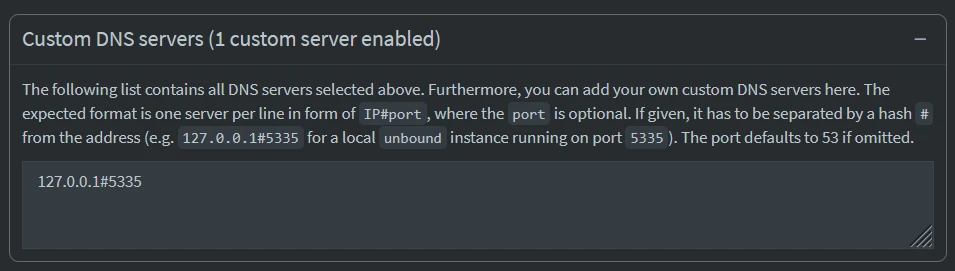
Done! Our network now uses Unbound for recursive DNS resolution, paired with Pi-hole for filtering.
Verify Unbound’s Recursive Resolution
To confirm Unbound is resolving queries recursively, we’ll use tcpdump and tshark to capture and analyze DNS traffic.
sudo tcpdump -i any -n port 53 -w unbound-capture.pcapLet's perform a DNS query to our Pi-hole + Unbound setup.
We assume that Pi-hole is set as the network DNS server and is the only one configured, so all DNS queries ultimately go to Unbound. If that's not the case, you can force dig to use a specific DNS server by adding @ip.of.dns.server, e.g., 10.0.2.15.
dig yahoo.comOnce the query is complete, we'll stop the capture and display the result.
$ tshark -r unbound-capture.pcap
1   2.196419 192.168.1.17 → 192.168.1.205 DNS 75 Standard query 0xac16 A yahoo.com
2   2.197336 192.168.1.205 → 192.35.51.30 DNS 86 Standard query 0x11f4 A yahoo.com OPT
3   2.207276 192.35.51.30 → 192.168.1.205 DNS 725 Standard query response 0x11f4 A yahoo.com NS ns1.yahoo.com NS ns5.yahoo.com NS ns2.yahoo.com NS ns3.yahoo.com NS ns4.yahoo.com NSEC3 RRSIG NSEC3 RRSIG AAAA 2001:4998:1b0::7961:686f:6f21 A 68.180.131.16 A 202.165.97.53 AAAA 2406:2000:1d0::7961:686f:6f21 AAAA 2001:4998:1c0::7961:686f:6f21 A 68.142.255.16 AAAA 2406:8600:f03f:1f8::1003 A 27.123.42.42 A 98.138.11.157 OPT
4   2.207477 192.168.1.205 → 27.123.42.42 DNS 86 Standard query 0x8b35 A yahoo.com OPT
5   2.379800 27.123.42.42 → 192.168.1.205 DNS 464 Standard query response 0x8b35 A yahoo.com A 98.137.11.163 A 74.6.231.20 A 74.6.143.25 A 74.6.143.26 A 74.6.231.21 A 98.137.11.164 NS ns3.yahoo.com NS ns1.yahoo.com NS ns5.yahoo.com NS ns2.yahoo.com NS ns4.yahoo.com A 68.180.131.16 A 68.142.255.16 A 27.123.42.42 A 98.138.11.157 A 202.165.97.53 AAAA 2001:4998:1b0::7961:686f:6f21 AAAA 2001:4998:1c0::7961:686f:6f21 AAAA 2406:8600:f03f:1f8::1003 AAAA 2406:2000:1d0::7961:686f:6f21 OPT
6   2.380605 192.168.1.205 → 192.168.1.17 DNS 171 Standard query response 0xac16 A yahoo.com A 98.137.11.163 A 74.6.231.20 A 74.6.143.25 A 74.6.143.26 A 74.6.231.21 A 98.137.11.164
The output should show Unbound recursively resolving the query, similar to using dig +trace. For example:
- Local Client Query to Unbound - 192.168.1.17 (client) asks 192.168.1.205 (Unbound resolver) for the A record of
yahoo.com. - Unbound Contacts the Root or a Cached TLD Server - 192.168.1.205 (Unbound) sends the query to 192.35.51.30 (a .com TLD name server) asking for A records of yahoo.com.
- Response with Yahoo's Name Servers - The .com TLD server doesn't return the IP yet, but instead gives Yahoo's authoritative name servers (ns1.yahoo.com, etc.), which Unbound must query next.
- Unbound Queries Yahoo's Name Serve - Unbound now contacts 27.123.42.42 (one of Yahoo's authoritative name servers).
- Yahoo's Name Server Responds with the Final A Records - Yahoo's server finally provides the IP addresses for
yahoo.com. - Unbound Returns the Answer to the Client - The Unbound resolver sends the resolved IP addresses back to the client.
This confirms Unbound is recursively resolving yahoo.com, just like using dig +trace!
Bypass Pi-hole and Unbound?
Let’s test our Pi-hole + Unbound setup by querying a blocked domain (e.g., analytics.yahoo.com). If Pi-hole is working correctly, the response should be 0.0.0.0, indicating the domain is blocked.
$ dig +short analytics.yahoo.com
0.0.0.0
Great! Pi-hole is still blocking the domain as expected.
But what if a device ignores Pi-hole and uses a public DNS server instead? Let’s try querying the same domain directly through Google’s DNS (8.8.8.8):
$ dig +short @8.8.8.8 analytics.yahoo.com
....
76.223.84.192
13.248.158.7
Uh-oh. The domain resolves just fine, bypassing our entire setup!
This exposes a critical vulnerability as devices on our network can bypass the Pi-hole/Unbound setup by using public DNS servers directly. Imagine an IoT device secretly phoning home to a blocked domain.
Without enforcement, our carefully configured DNS sinkhole becomes little more than a suggestion. The good news? We can fix this by forcing all DNS traffic through Pi-hole, and that’s exactly what we’ll do next.
Enforce DNS Traffic Through Pi-hole
Let’s force all DNS traffic through Pi-hole + Unbound using router rules. This means if any user sets their own DNS server, the request to that server is redirected to our DNS resolver. This is how it should work:
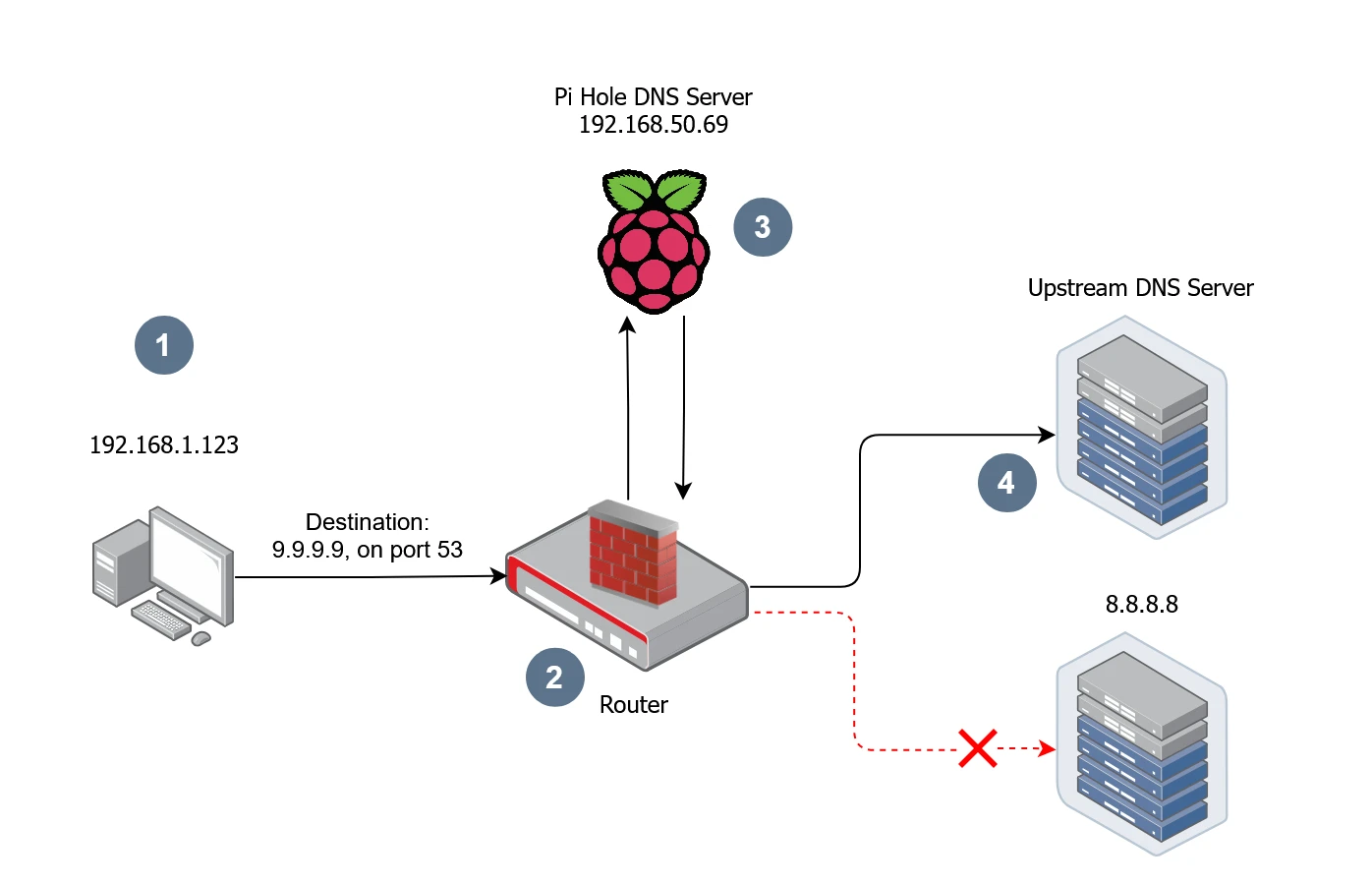
- Device is trying to resolve a domain name with Google's DNS.
- The request first hits the router where the Network Address Translation (NAT) rule will intercept and forward the request to Pi Hole.
- Pi-hole DNS server will do the filtering or any other operation before.
- Forward to Pi Hole configured Upstream DNS resolver.
To implement that we need to update the router configuration, in short we need to intercept and redirect DNS queries.
Step 1: Create a Port Forward Rule
Protocol: TCP, UDP
Source zone: lan
External port: 53
Destination zone: lan
Internal IP address: 192.168.1.101 (this is address of my PiHole, yours may be different)
Internal port: 53
Step 2: Create a NAT Rule to Masquerade Responses
Protocol: TCP, UDP
Outbound zone: lan
Source address: any
Source port: any
Destination address: 192.168.1.101
Destination port: 53
Action: MASQUERADE - Automatically rewrite to outbound interface IP
Rewrite port: do not rewrite
This ensures responses appear to come from the original DNS server (e.g., 8.8.8.8), preventing client complaints.
Step 3: Test the Setup
Add a dummy CNAME record to Pi-hole to verify redirection. On Pi-hole: Go to Local DNS > DNS Records and add:
Domain: nat.test
IP: 10.10.10.10 (or any unique dummy IP).
On a client machine run the following command:
dig +short nat.test @8.8.8.8If it returns 10.10.10.10, your router successfully "fooled" the client into thinking Google (8.8.8.8) answered, but it was actually your Pi-hole.
What’s Next?
With Unbound and Pi-hole now enforcing recursive DNS resolution across your network, your DNS is faster, more private, and under your control. However, a single point of failure, such as our Pi-hole server going down, could disrupt DNS resolution for our entire network.
In the next post, we’ll explore how to implement High Availability for Pi-hole using Keepalived, ensuring our DNS infrastructure remains resilient and reliable.

Creating a Containerized Remote Serial Interface with Docker and Socat
Learn how to set up remote serial communication for embedded development using Socat, Docker, and Raspberry Pi. Streamline UART access and debug from anywhere!

Cross-Compiling OpenOCD: A Step-by-Step Walkthrough
Learn how to build OpenOCD binaries on Ubuntu 22.04 for both the ARM64 and AMD64 target architectures. A great way to share a consistent OpenOCD build across your Debian systems

DNS Sinkhole: How to Block Malicious Sites and Trackers at the Network Level
Deploy Pi-hole on a Raspberry Pi to block malicious domains and trackers network-wide. Learn how to configure blocklists and prevent DNS bypasses in this hands-on guide.
Whether you're building something new, fixing stability issues, or automating what slows your team down — we can help.