
Eliminating DNS Downtime: Build a High Availability Pi-hole Cluster
Avoid DNS downtime! Learn how to set up a redundant Pi-hole system using Keepalived and VRRP. Ensure seamless failover if your primary DNS server crashes—step-by-step guide with hands-on examples.


Why Redundancy is Critical
So far, we have built a self-hosted DNS infrastructure with Pi-hole and Unbound, which provides control, privacy, and performance. However, what happens if your primary Pi-hole server crashes, requires maintenance, or malfunctions? Without a backup, your entire network loses DNS resolution, and you might encounter an angry spouse asking why the internet is not working (ᵕ • ᴗ •). Eliminating DNS downtime is the next logical step in hardening your home lab.
Say hi! to VRRP (Virtual Router Redundancy Protocol) and Keepalived. These tools allow us to build a high availability Pi-hole cluster using at least two servers. One server acts as the primary (Master), and the other acts as the backup (Backup). Both servers share a virtual IP address; if the primary fails, the backup seamlessly takes over.
How High Availability Pi-hole Works
Here is the architecture we are aiming for:
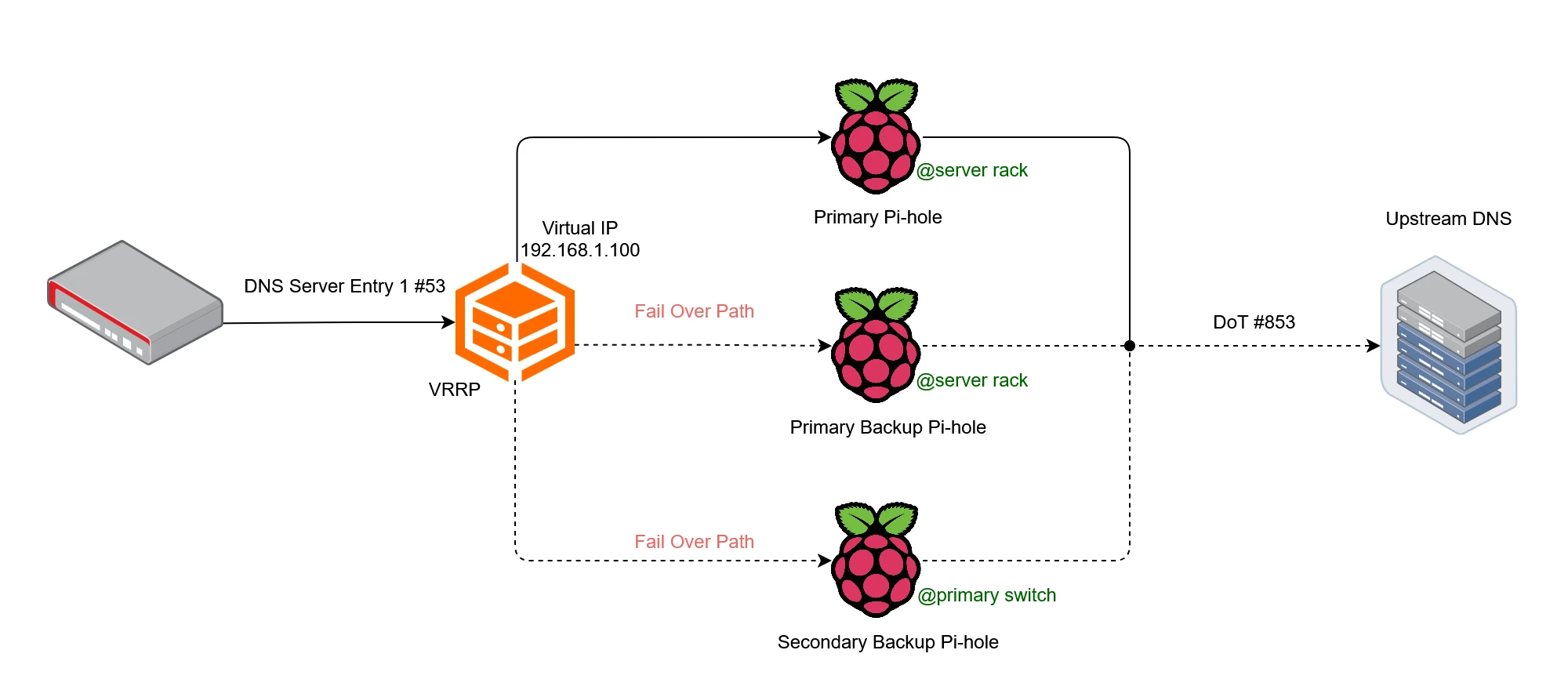
- Two Pi-hole servers, each with a unique physical IP address.
- A shared virtual IP address that clients use as their primary DNS server.
- Keepalived running on both servers, managing the failover process via VRRP.
If the primary Pi-hole server goes down, the backup automatically takes over the virtual IP address, ensuring uninterrupted DNS service.
This guide assumes both Pi-hole servers are already configured identically. Cloning configurations is outside the scope of this post, but it is critical for a seamless failover.
Setting Up Keepalived for Pi-hole Failover
There are couple of steps we have to do for a seamless setup.
Step 1: Install Keepalived on Master and Backup Nodes
Run the following command on both your primary and backup Pi-hole servers:
sudo apt install keepalivedStep 2: Configure the VRRP Instances for Master and Backup
Edit the Keepalived configuration file on both servers:
sudo nano /etc/keepalived/keepalived.confPrimary server configuration:
vrrp_instance VI_1 {
    state MASTER
    interface eth0
    virtual_router_id 51
    priority 101
    advert_int 1
    authentication {
        auth_type PASS
        auth_pass your_password
    }
    virtual_ipaddress {
        192.168.1.100
    }
}
Backupserver configuration:
vrrp_instance VI_1 {
    state BACKUP
    interface eth0
    virtual_router_id 51
    priority 100
    advert_int 1
    authentication {
        auth_type PASS
        auth_pass your_password
    }
    virtual_ipaddress {
        192.168.1.100
    }
}Replace your_password with a strong password for authentication between servers. Also, ensure eth0 matches your network interface (use ip a to check).
Step 3: Initialize the Keepalived Service
Run the following command on both servers:
sudo service keepalived startStep 4: Update Pi-hole Hostname (Optional but Recommended)
To avoid confusion, update the Pi-hole hostname to reflect the actual server name (instead of pi.hole for both). Edit the Pi-hole configuration:
sudo nano /etc/pihole/setupVars.confChange the line:
dns.piholePTR=HOSTNAMEReplace HOSTNAME with the actual hostname of each server (e.g., network-primary and network-secondary).
Validating the Failover: Simulating a Server Crash
Let’s verify that our failover system works as expected. We start by querying with the primary server active:
$ nslookup msn.com
Server:  network-primary
Address:  192.168.1.100

Non-authoritative answer:
Name:    msn.com
Address:  204.79.197.219
The response comes from network-primary, confirming the primary server is handling requests.
Next we simulate a primary server failure. Stop the keepalived service on the primary server to simulate a failure:
sudo service keepalived stopNow, run the same nslookup command again:
$ nslookup msn.com
Server:  network-secondary
Address:  192.168.1.100

Non-authoritative answer:
Name:    msn.com
Address:  204.79.197.219
The response now comes from network-secondary, proving that failover works! The virtual IP (192.168.1.100) has seamlessly switched to the backup server.
What’s Next?
With High Availability Pi-hole, your DNS infrastructure is now redundant and resilient. You will no longer face downtime if a single server fails.
In the next post, we shall explore DNS over TLS (DoT) and DNS over HTTPS (DoH) to encrypt your DNS queries and protect them from snooping.

Remote View Raspberry Pi Camera Stream with Docker
Learn how to containerize the Raspberry Pi Camera Module using MediaMTX and Docker for low-latency remote debugging and visual feedback directly in VS Code.

Self-Hosted Recursive DNS Resolver: How to Take Full Control of Your DNS with Unbound
Are you tired of relying on public DNS providers? Learn how to set up Unbound, a self-hosted recursive DNS resolver, to boost privacy, security, and performance with hands-on examples and testing.

How to Find the Memory Address of a Symbol in an ELF File
A quick and useful tip for locating symbol memory addresses in ELF files using arm-none-eabi-nm combined with grep—perfect for embedded debugging scenarios like setting up SEGGER RTT or inspecting linker placements and runtime symbols.
Whether you're building something new, fixing stability issues, or automating what slows your team down — we can help.