
Including External Libraries in CMake Projects
Learn how to use CMake’s FetchContent module to automatically download and integrate libraries like CMSIS into your embedded projects, eliminating the hassle of manual copying and updates.


The straight forward way to include libraries is to manually copy them from source to destination. This is relatively easy to do, but managing and updating the library later might be a pain. To make this process more automated, CMake has a handy module called FetchContent which can automatically download and make libraries available to the project.
A common module that any ARM cortex project needs is the CMSIS package. In most cases, it is copied manually, but let's see an example on how to do it with CMake's FetchContent module.
# ====================================================================
# Includes
# ====================================================================
include(FetchContent)
# ====================================================================
# CMSIS Component and Setup
# ====================================================================
FetchContent_Declare(
  CMSIS
  GIT_REPOSITORY https://github.com/ARM-software/CMSIS_6.git
  GIT_TAG        v6.1.0
)
FetchContent_MakeAvailable(CMSIS)
# Add CMSIS include paths
# --------------------------------------------------------------------
target_include_directories(${CMAKE_PROJECT_NAME} PRIVATE
  ${cmsis_SOURCE_DIR}/CMSIS/Core/Include
  ${cmsis_SOURCE_DIR}/Device/ARM/ARMCM0/Include
)
This CMake script will download CMSIS version 6 from GitHub and make the required ARM M0 controller directories available to the project (this is an example usage; if another core is used, the include paths must be updated).
Once CMake parses and runs the script, we will have the source of the library download under _deps directory.
Inside this directory, there we will find three additional directories for each library we include:
<library>-build: This directory contains the results of the build process for the library. If the library includes its own build targets, such as static or shared libraries, they will be placed in this directory.<library>-src: Contains the actual source code of the library as it was downloaded or cloned from the repository. It includes all the original files, directories, and submodules exactly as they appear in the source repository.<library>-subbuild: Used by CMake to manage the build process of the library in isolation. It contains a standalone CMake build system specifically for the library.
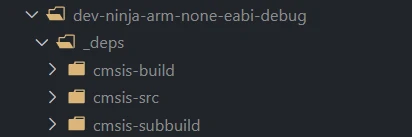
CMake will download and configure the library for each build target. It is possible to change the dependency target directory with FETCHCONTENTBASEDIR environment variable.
If the library is more complex, lets say FreeRTOS, the integrator must make sure that all the required compile and link options, and defines are provided to the library when compiled.

Advanced RTT in Embedded Rust: A Guide to Multi-Channel Logging and Binary Streaming (Part 2)
Stream RP2040 sensor data over RTT and decode logs in real time. Use Python to visualize binary temperature readings and turn raw bytes into insights.

How to Use RTT in Embedded Rust: Setup and Logging
Learn how to use RTT in Embedded Rust for fast, non-blocking debug logging. This guide covers setup, rtt-target usage, OpenOCD configuration, and VS Code auto-start.
Creating a Containerized Remote Serial Interface with Docker and Socat
Learn how to set up remote serial communication for embedded development using Socat, Docker, and Raspberry Pi. Streamline UART access and debug from anywhere!
Whether you're building something new, fixing stability issues, or automating what slows your team down — we can help.